How to Make tmux’s “Windows” Behave like Browser Tabs
Make tmux tabs (“windows”) look more like browser tabs, and control them using the same keyboard shortcuts that you’re used to from browsers and other apps.
Key bindings
Add the snippet below to your ~/.tmux.conf file to get browser-like keyboard shortcuts for working with tabs (tmux calls them “windows”):
Ctrl + t Open a new tab.
Ctrl + Page Down, Ctrl + Page Up Go to the next, previous tab.
Ctrl + Shift + ←, Ctrl + Shift + → Move the current tab left, right (swapping it with the left or right adjacent tab).
Alt + 1 … 8 Jump to tab 1 … 8.
Alt + 9 Jump to the rightmost tab.
Ctrl + Alt + w Close the current tab.
Ctrl + Alt + q Ask for confirmation before closing all tabs and killing the current tmux session.
F11 Toggle the current pane between zoomed (occupying the whole window and hiding all other panes) and unzoomed (normal).
set -g base-index 1       # Start numbering windows at 1, not 0.
set -g pane-base-index 1  # Start numbering panes at 1, not 0.
bind -n C-t new-window
bind -n C-PgDn next-window
bind -n C-PgUp previous-window
bind -n C-S-Left swap-window -t -1\; select-window -t -1
bind -n C-S-Right swap-window -t +1\; select-window -t +1
bind -n M-1 select-window -t 1
bind -n M-2 select-window -t 2
bind -n M-3 select-window -t 3
bind -n M-4 select-window -t 4
bind -n M-5 select-window -t 5
bind -n M-6 select-window -t 6
bind -n M-7 select-window -t 7
bind -n M-8 select-window -t 8
bind -n M-9 select-window -t:$
bind -n C-M-w kill-window
bind -n C-M-q confirm -p "Kill this tmux session?" kill-session
bind -n F11 resize-pane -Z
Appearance
Add the snippet below if you also want your tmux tabs to look a bit more like browser tabs. It makes the current tab stand out a lot more by having a different background color:
set -g status-style "bg=default"
set -g window-status-current-style "bg=default,reverse"
set -g window-status-separator ''  # No spaces between windows in the status bar.
set -g window-status-format "#{?window_start_flag,, }#I:#W#{?window_flags,#F, } "
set -g window-status-current-format "#{?window_start_flag,, }#I:#W#{?window_flags,#F, } "
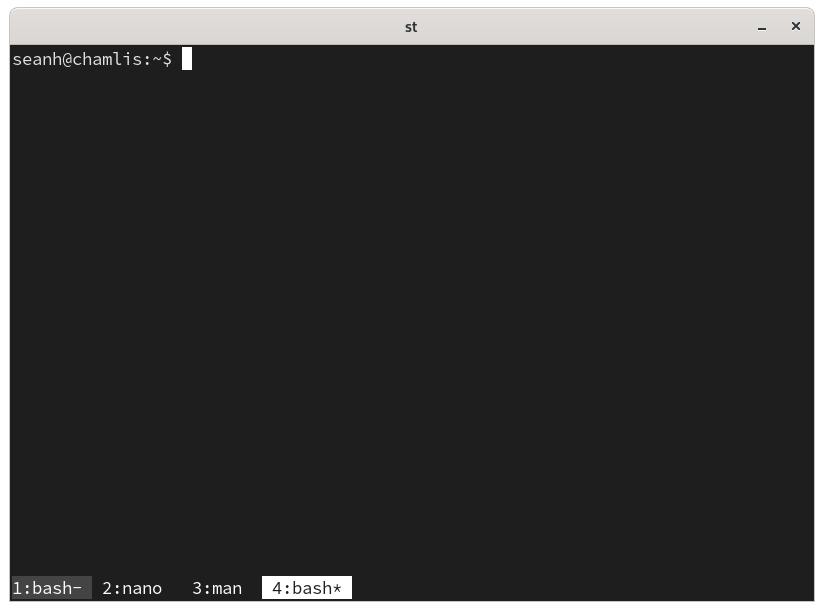
You can also move the tabs to the top of the window with set -g
status-position top, but I find I prefer them at the bottom.
In the screenshot I’ve also removed the default stuff that tmux puts in the bottom-left and bottom-right of the window:
set -g status-left ''
set -g status-right ''