How to back up multiple Macs to one Time Machine drive
How to back up multiple Macs to a single external drive using macOS’s Time Machine. Tested on macOS 27.0 Golden Gate.
You can use a single external drive as the Time Machine backup disk for multiple different Macs. I’m not talking about making a shared drive visible over the network: instead I simply plug a USB external drive into one Mac, back up that Mac, then unplug the drive, take it over to another Mac, plug it in, and back up that Mac.
This is a little inconvenient because only one Mac can be backing up at a time, and you have to sneakernet the backup drive between them. It’s also less robust: if the drive breaks you lose the backups of all your Macs at once. But it avoids having to buy a separate backup drive for each Mac.
Some fun things I had to learn to get this working:
-
You need to use Disk Utility to create a separate APFS volume on the backup drive for each Mac:
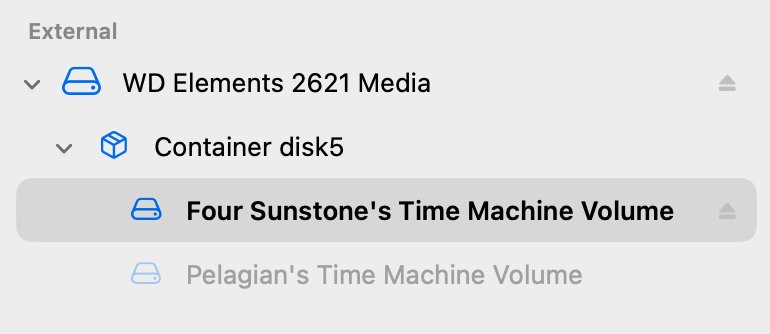
macOS’s Disk Utility showing an external drive with two APFS volumes. If you back up two Macs to the same APFS volume, Time Machine on each Mac keeps taking over ownership of all the backups from the other Macs: it thinks they’re all backups of the one Mac that you’re currently at.
You don’t need to partition the drive, just create an APFS “volume” for each Mac all within the same APFS “container”. With APFS volumes you don’t need to specify the size of each volume in advance, they can all share the same disk space.
-
You don’t need to create encrypted APFS volumes in Disk Utility.
Time Machine does its own encryption, it’ll ask you for an encryption password when setting up the backup target in Time Machine settings. (What Time Machine actually seems to do is just enable APFS encryption for the volume, anyway).
-
The maximum Time Machine/APFS encryption password length is 127!
It’ll crash without a helpful error message if you give it a 128-character password. I found this out the fun way because I wanted to use my password manager to create the longest, most secure password possible, and the maximum length of password that my password manager will generate is 128.